
TL;DR:
- Many independent musicians mistakenly believe a high-resolution mix is ready for CD duplication, but compliance with Red Book standards is essential for universal playback and avoiding rejection. Red Book mastering involves strict technical requirements, including sample rate, bit depth, subcodes, and error correction, which ensure reliability and professional quality. Proper preparation, validation, and understanding of these standards help artists produce compliant CDs that meet industry expectations and market needs.
Many independent musicians assume that a high-resolution mix exported from their DAW is ready for CD duplication. It isn't. The gap between a polished digital file and a fully compliant CD master is wider than most artists expect, and crossing it incorrectly costs real money in rejected submissions, manufacturing delays, and disappointing playback results. The Red Book standard defines every technical requirement a disc must meet to function as a true Compact Disc Digital Audio (CD-DA) release, and understanding it is the first step toward a professional, reliable CD that works everywhere.
Table of Contents
- What is Red Book mastering?
- Core requirements of Red Book-compliant mastering
- How Red Book error correction ensures playback quality
- CD authoring details: subcodes, PQ gates, and final quality checks
- Why Red Book mastering still matters in 2026
- Professional Red Book CD mastering services for your music
- Frequently asked questions
Key Takeaways
| Point | Details |
|---|---|
| Red Book defined | Red Book mastering is the industry-standard for professional, universally compatible CDs. |
| Compliance checklist matters | Audio must meet strict format and metadata requirements to pass replication and avoid errors. |
| Error correction protects audio | Red Book error correction ensures your music survives real-world disc flaws and plays reliably. |
| Authoring details are critical | Proper subcode embedding, software checks, and avoiding common pitfalls are essential for master quality. |
| Mastering services add value | Professional studios provide expertise and resources to guarantee Red Book compliance and optimal results. |
What is Red Book mastering?
Red Book mastering is the process of preparing audio so that it fully conforms to the CD-DA specification, which Philips and Sony jointly developed in 1980. The name comes from the physical red binder that originally housed the technical document. It is not a brand or a software setting. It is a precisely defined set of rules that every consumer CD player on the planet is built to read.
The CD-DA specification sets the following core parameters:
- Sample rate: 44.1 kHz, always. No exceptions.
- Bit depth: 16-bit PCM stereo encoding.
- Error correction: Cross-Interleaved Reed-Solomon Coding (CIRC), which we'll cover in depth below.
- Subcodes: Eight subcode channels (P through W) that store track indexing and timing data.
- Maximum program length: 74 minutes of audio on a standard disc (80 minutes on extended capacity).
- Track count: A minimum of one and a maximum of 99 tracks.
"The Red Book standard is not a preference or a recommendation. It is the technical foundation that makes a CD a CD. Without full compliance, a disc may play on some players and fail on others."
To understand more about how this fits into the broader picture of professional disc preparation, the full CD mastering process steps cover each phase from initial session setup through replication-ready delivery. Knowing these steps upfront helps you approach the project with realistic expectations and a clear workflow.
Core requirements of Red Book-compliant mastering
With a solid understanding of what Red Book mastering is, let's break down the checklist every CD master must pass to be accepted at replication plants. Missing even one item can trigger a rejection, forcing you to revise and resubmit before manufacturing begins.
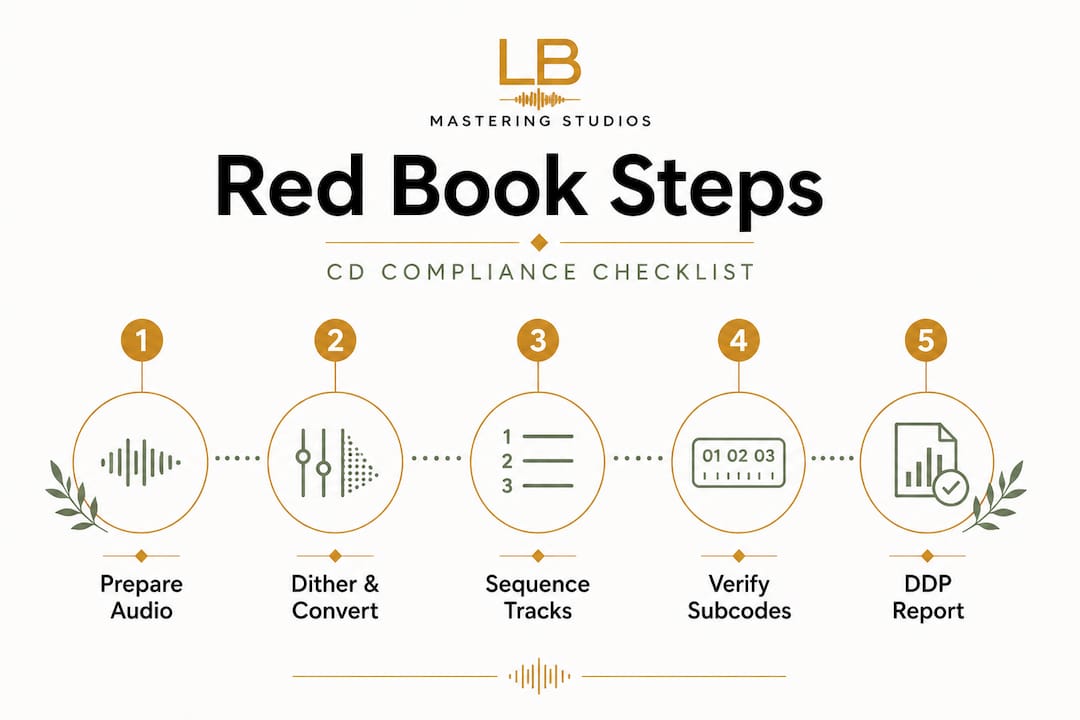
According to the CD servicing asset specifications used across major labels, a compliant Red Book master must include all of the following:
| Requirement | Specification | Why it matters |
|---|---|---|
| Audio format | 44.1 kHz / 16-bit PCM stereo | The only format CD players can read natively |
| Track count | 1 to 99 tracks | Exceeding 99 tracks violates the standard |
| Pre-gap / pause | Minimum 2-second pre-gap on track 1 | Required for player synchronization |
| PQ subcodes | Track start markers, index points, TOC | Tell the player where each song begins and ends |
| ISRC codes | One unique code per track | Identify recordings for royalty tracking |
| UPC/EAN | One barcode for the album | Identifies the overall release |
| CD-Text | Album title, track titles, artist name | Optional but strongly recommended |
| Delivery format | DDP 2.0 image (single file package) | The replication plant's accepted submission format |
The numbered steps to compliance
- Start in the right format. Export your mix at 44.1 kHz / 24-bit for mastering, then dither down to 16-bit during the mastering session. Never deliver a raw 48 kHz or 96 kHz file to replication.
- Sequence your album. Set exact track start points, choose your gaps (silence between tracks), and decide on intentional crossfades before encoding begins.
- Embed PQ subcodes. These subcodes are the invisible metadata layer inside the disc's data stream. They tell CD players the Table of Contents (TOC) and where every track begins.
- Enter ISRC and UPC codes. Each track gets its own unique ISRC. Obtain one UPC/EAN for the album. These are registered, not invented, so plan this step before you approach the plant.
- Add CD-Text. Fill in artist name, album title, and individual track titles using only standard ASCII characters. Special characters and emoji will corrupt the data.
- Generate a DDP image. A DDP (Disc Description Protocol) image bundles every element, audio, PQ data, CD-Text, and ISRC, into a single verified package that replication plants accept with confidence.
- Run a compliance check. Use a dedicated validator to verify the DDP before submission. Errors caught at this stage cost nothing. Errors caught at the plant cost time and money.
Pro Tip: Before booking manufacturing, ask your mastering engineer for a DDP verification report. Reputable engineers provide this as part of the delivery package, and it confirms that every subcode, ISRC, and audio file has passed software validation.
You can also cross-reference your preparation against a mastering engineering checklist to ensure nothing slips through before you hand files over to a plant.
How Red Book error correction ensures playback quality
Meeting the technical requirements is just part of the picture. Let's look at how Red Book's error correction guarantees your music plays reliably even when CDs face real-world wear and tear.

Understanding CIRC
The CD format stores data on a spiral track as microscopic pits and lands read by a laser. That physical surface is vulnerable. Fingerprints, scratches, and dust scatter the laser beam, causing read errors. Without correction, those errors translate directly into pops, clicks, or dropouts in your audio.
Red Book solves this with CIRC error correction, which stands for Cross-Interleaved Reed-Solomon Coding. Here is what makes CIRC powerful:
- Interleaving: Audio data is deliberately scrambled across a wider physical area of the disc before it is written. Even a long scratch typically only affects a small portion of any individual audio sample, because consecutive samples are stored far apart from each other on the disc.
- Reed-Solomon codes: Mathematical redundancy data is written alongside the audio. When a read error occurs, the player uses this redundancy to reconstruct the correct values without any audible effect.
- Two-level correction (C1 and C2): The C1 level handles small, random errors. The C2 level handles burst errors (longer damage like a deep scratch). Working together, these two layers can correct significant physical defects silently.
CIRC versus raw digital audio
The difference is stark, and it matters for your release:
| Feature | Red Book CD (CIRC) | Raw digital file |
|---|---|---|
| Error detection | Two-level C1/C2 correction | None |
| Burst error recovery | Yes, via interleaving | No |
| Physical damage tolerance | High | N/A |
| Playback reliability on hardware players | Maximized | Depends entirely on file integrity |
| Data verification at authoring | Built into DDP validation | Requires separate tools |
For musicians who want to understand where errors can sneak in and how to avoid them, a closer look at common mastering errors gives concrete examples of what goes wrong and how experienced engineers fix it.
CD authoring details: subcodes, PQ gates, and final quality checks
Once you understand error correction, the next step is the final authoring phase, where your master is assembled, verified, and prepared for bulletproof replication.
PQ subcodes and PQ gate verification
The P and Q subcodes are the most critical subcode channels in Red Book. The P subcode flags track pause periods. The Q subcode carries the TOC (Table of Contents), including track numbers, timing, and index points. Together they tell any CD player exactly where to find each song and how to navigate the disc.
PQ gate verification is the process of checking that every track start, index marker, and TOC entry is positioned accurately and error-free. Professional authoring software like Steinberg WaveLab, Sonoris DDP Creator, or Pyramix reads the encoded DDP and confirms that all subcode data aligns with the audio. If a track marker lands a few milliseconds off, the player will cue to the wrong point and the listener hears an abrupt cut or a missed intro.
The numbered steps for clean authoring and delivery
- Use professional authoring software. WaveLab, Sonoris, or similar tools are purpose-built to handle PQ encoding, CD-Text entry, and DDP generation. Consumer DAW exports do not reliably produce compliant DDP files.
- Set accurate track start points. Every track start should land precisely at the right moment. Confirm against the waveform visually and by ear.
- Verify peak levels. Keep peak levels within the range of -3 to -10 dBFS on the mix bus before mastering. Applying a hard limiter at the mix stage removes the headroom a mastering engineer needs to work with.
- Use only ASCII characters in CD-Text. Non-ASCII characters (accented letters, special symbols, emoji) break CD-Text encoding and cause replication plants to reject your submission or output corrupted text on disc.
- Assign ISRC codes before encoding. ISRC codes must be assigned and confirmed before the DDP is generated, not added afterward. Retroactively changing them requires re-generating the entire DDP.
- Run a DDP validator before submission. Major labels, including Universal Music Group, mandate DDP 2.0 as the single accepted delivery format with all embedded metadata verified.
- Listen through the DDP. Play the DDP image in a DDP player from start to finish and confirm every transition, gap, and track marker sounds exactly right before you send anything.
Pro Tip: Never assume your DAW's CD-burn function creates a Red Book-compliant disc. Burning a disc for personal reference is fine, but replication plants require a verified DDP image, not a burned CD-R, for professional manufacturing.
For a thorough walkthrough of how to approach your session before sending files, the audio finishing and track prep guide is a useful resource that covers what your engineer needs from you to produce a clean master.
Why Red Book mastering still matters in 2026
Streaming now accounts for the overwhelming majority of music consumption. Given that reality, it is tempting to view Red Book mastering as an archaic technicality reserved for major labels and legacy engineers. That view is a costly mistake for any artist serious about their career.
Here is the practical truth: CD manufacturing is alive and growing within specific markets. Collector communities, independent record stores, international distributors, and dedicated fan bases continue to purchase physical media at rates that make CD releases financially worthwhile. Japanese music markets, in particular, rely heavily on CD sales, and releases intended for international distribution without a compliant Red Book master face additional licensing barriers.
There is also the professional credibility factor. When you submit a release to a distributor, a label, or a sync licensing platform that handles physical media, a properly authored Red Book master signals immediately that you operate at a professional level. Engineers who know how to master for streaming and CD simultaneously understand that different formats have entirely different technical targets and that a single "master" file cannot serve all purposes without expert preparation.
From our perspective, after more than 44 years working with artists across every genre, the musicians who invest in understanding Red Book requirements always come out ahead. They avoid rejection fees. They protect their ISRC registrations. They maintain the metadata integrity that feeds into royalty collection. And they build a catalog of assets that remains commercially valuable even as formats evolve.
Red Book is not obsolete. It is a precision standard that separates professional releases from amateur ones. That distinction still matters, and it will continue to matter wherever physical music is sold, collected, or archived.
Professional Red Book CD mastering services for your music
If you're preparing a professional release and want every technical detail covered, here's your next step.
At LB-Mastering Studios, we handle the complete Red Book process for artists worldwide, from initial audio mastering through DDP delivery with full PQ encoding, ISRC embedding, and compliance validation. Our Red Book CD mastering services are built specifically for musicians who want their CD release to meet replication standards the first time, without costly revisions or rejected submissions.

We also offer a free audio mastering checklist you can download and use before your session to confirm your files are prepared correctly. Whether you're releasing your first album or your tenth, we work directly with you, engineer to artist, to make sure the final product is something you're proud to put in your listeners' hands. Reach out today and let's build a master that's ready for every format your audience cares about.
Frequently asked questions
What audio format do I need for Red Book mastering?
Audio must be 44.1 kHz and 16-bit PCM, in stereo, for Red Book CD compliance. Any other sample rate or bit depth requires conversion before a compliant disc can be manufactured.
Can I send a 24-bit master for CD duplication?
A 24-bit master must be converted to 16-bit PCM before manufacturing a Red Book CD. This conversion, called dithering, is a standard part of the mastering process and should be handled by your mastering engineer.
What is a DDP image and why is it important for CDs?
A DDP image is the accepted delivery format for replication since it ensures all Red Book requirements and metadata are embedded and verified in a single validated package. Sending individual audio files instead of a DDP image is a common mistake that delays manufacturing.
Will Red Book mastering guarantee my CD works everywhere?
Following Red Book specifications maximizes compatibility across all standard CD players, but PQ gate errors or physical manufacturing defects can still affect playback. That is why software validation before submission is a non-negotiable step, not an optional one.