
TL;DR:
- Preparing a mix involves removing all bus processing, ensuring proper headroom, and exporting correct format.
- Reference tracks in the same genre and level-matched help guide tonal balance and overall sound.
- Different formats require tailored mastering, focusing on loudness, peak limits, and physical constraints.
You've spent weeks perfecting your mix, and now you're staring at the final step that separates a good recording from a release-ready track. Mastering is where your music gets polished, balanced, and optimized so it sounds strong on every platform, from Spotify to vinyl to a CD player in someone's car. Many independent musicians struggle to bridge that gap between a finished mix and a truly professional master. This guide walks you through every critical step, covering mix preparation, reference tracks, the mastering signal chain, and format-specific requirements, so your next release competes with commercial releases right out of the gate.
Table of Contents
- Preparing your mix for mastering
- Choosing reference tracks to guide your master
- Executing the mastering process: step-by-step
- Mastering for different formats: streaming, CD, and vinyl
- What most guides miss about mastering a track
- Professional mastering services to elevate your music
- Frequently asked questions
Key Takeaways
| Point | Details |
|---|---|
| Mix preparation matters | A clean mix with proper headroom sets the stage for a successful master. |
| Reference tracks are essential | Use 2-3 similar tracks for standards and balanced decisions throughout the mastering process. |
| Check translation across devices | Test your master on multiple playback systems to avoid surprises on release. |
| Format-specific mastering is critical | Adjust your mastering process for streaming, CD, or vinyl to achieve best results. |
| Professional help streamlines the process | Expert mastering services and checklists can elevate your music and save time. |
Preparing your mix for mastering
Before you open a single mastering plugin, your mix needs to be in the right condition. A poorly prepared mix is the most common reason a master falls short, and no amount of processing can fix a mix that was exported incorrectly or left with unwanted bus processing baked in.
The mastering process starts with a clean stereo mix exported as a 24-bit WAV file at 44.1 or 48 kHz, with 3 to 6 dB of headroom, peaks sitting between -6 and -3 dBFS, and no master bus processing like limiters or multiband compressors left active. That headroom gives the mastering engineer, or you, enough space to apply gain staging and limiting without immediately hitting a ceiling and introducing distortion.
Here is a clean checklist to run through before exporting your mix:
- Format: Stereo WAV file, 24-bit or 32-bit float
- Sample rate: 44.1 kHz or 48 kHz (match your session rate)
- Peak level: Between -6 and -3 dBFS, never clipping
- Headroom: At least 3 dB of space below 0 dBFS
- Master bus: Remove all limiters, compressors, stereo wideners, and clippers
- Clipping: Zero intersample or hard clips across the entire track
- Noise: Silence any hiss, hum, or click artifacts before export
For a detailed breakdown of every item on this list, our audio mastering checklist covers the specifics format by format.
Export settings by target platform:
| Platform | Bit depth | Sample rate | Peak target | Notes |
|---|---|---|---|---|
| Streaming (Spotify, Apple) | 24-bit | 44.1 kHz | -3 dBFS | Remove all limiters |
| CD replication | 24-bit | 44.1 kHz | -3 dBFS | Dither to 16-bit at export |
| Vinyl lacquer | 24-bit | 48 kHz | -6 dBFS | Extra headroom recommended |
| Sync / TV | 24-bit | 48 kHz | -3 dBFS | Check delivery specs per client |
If you are working with video distribution as well, reviewing video distribution tips will help you understand how audio masters interact with video deliverables in ways that catch many artists off guard.
One of the most overlooked preparation issues is hidden bus processing. Many DAWs (digital audio workstations) like Ableton Live, Logic Pro, or Pro Tools insert a default limiter or EQ on the master bus when you start a new session. You may not have put it there, but it is still coloring your export. Always check the signal chain on your output bus before bouncing, and if you want clean headroom and improving track clarity right from the start, export with a completely clean output channel.
Pro Tip: Bounce your mix twice, once with and once without any reference processing on the master bus. Compare both in your mastering session to confirm you are working from the cleanest possible source.
Choosing reference tracks to guide your master
Once your mix is properly prepared, reference tracks become your most valuable tool. Many engineers describe mastering without references as "tuning an instrument in a silent room." You might get close, but you have no real benchmark for what "correct" sounds like in a commercial context.

Always use 2 to 3 level-matched reference tracks from the same genre to guide your decisions on balance, width, and punch. Level-matching means you are listening at the same perceived loudness, because louder almost always sounds better to our ears. Without matching levels, you will chase loudness rather than genuine quality.
When picking reference tracks, follow these criteria:
- Genre match: Same or very similar genre to your track
- Era: Released within the last 3 to 5 years, since mastering standards have shifted
- Commercial release: Tracks that went through professional mastering studios
- Tonal balance: Pick 2 to 3 that represent different aspects of what you want, not just one
Here is what to listen for when you compare your pre-master mix against your references:
- Low-end balance: Is the kick and bass sitting at the same relative level?
- High-frequency air: Are cymbals and vocals detailed without being harsh?
- Stereo width: Does the reference feel wider or narrower than your mix?
- Punch and transient impact: Do drums cut through with the same authority?
- Dynamic range: Does the reference breathe and move, or is it flat and compressed?
Reference comparison table:
| Element | What to check | Common issue |
|---|---|---|
| Low-end | Kick weight vs. sub rumble | Too much sub, not enough punch |
| Midrange | Vocal clarity vs. instrument clash | Crowded 500 Hz to 2 kHz range |
| High-end | Presence and air vs. harshness | Harsh 5 to 8 kHz buildup |
| Stereo width | Center focus vs. side content | Over-widened mix, weak mono |
| Loudness | Perceived level vs. digital peak | Mix too quiet or already clipping |
The mastering preparation checklist includes a reference track worksheet you can use to document your observations and keep your session focused.
Pro Tip: Use the A/B compare function in your mastering software to flip between your track and the reference in real time. Keep the levels matched within 0.5 dB to remove loudness bias. Even experienced engineers use this step every single session.
Executing the mastering process: step-by-step
Now that your mix is clean and your references are loaded, you can move through the actual mastering signal chain. This sequence is the industry standard used in professional mastering studios, including the analog-to-digital hybrid chains that define the sound of top-tier releases.
- Linear phase EQ: Start by correcting tonal imbalances, cutting problems before boosting. Remove any buildup in the low-mids (300 to 500 Hz), add subtle air above 12 kHz if needed, and match the tonal curve of your reference tracks.
- Stereo correction: Check the mono compatibility of your mix. Use a mid-side EQ to tighten the low end in the center channel if bass frequencies are smearing across the stereo field.
- Compression: Apply gentle bus compression, 1 to 2 dB of gain reduction at most, to glue the elements together. Aim for slow attack (30 to 50 ms) and medium release (200 to 300 ms) to preserve transients.
- Saturation or harmonic enhancement: A small amount of analog-style saturation adds warmth and perceived loudness without increasing peak levels. Use this sparingly.
- Multi-band limiting or dynamic EQ: Address any frequency-specific dynamic issues, like a bass that gets too loud during the chorus, without affecting the full mix.
- Brickwall limiting: Apply a final limiter to bring your track to the target integrated loudness, typically -14 LUFS (loudness units relative to full scale) for streaming with a true peak ceiling of -1 dBTP (decibel true peak).
- Metering and verification: Check integrated loudness (LUFS), short-term loudness, true peak levels, and dynamic range before exporting.
- Export and dither: Export with dither if you are reducing bit-depth, for example going from 24-bit to 16-bit for CD. Dither adds low-level noise to mask quantization errors and preserves perceived audio quality at lower bit depths.
Important: Always check masters on multiple systems including studio monitors, headphones, car speakers, phone speakers, and in mono before calling your master final. What sounds great on your studio setup may reveal problems on a consumer Bluetooth speaker or a car stereo.
Translation testing is not optional. We have seen countless masters returned because engineers skipped this step. A track can sound powerful in the studio and completely fall apart in mono on a phone speaker because of phase cancellation issues in the mix that only become obvious when checking across systems. For tracks that need attention to detail beyond standard mastering, our team uses audio restoration techniques to address issues like noise, clicks, and spectral artifacts before the mastering stage begins.
The single most common mistake at this stage is overprocessing. Adding too much EQ, applying heavy compression, and pushing the limiter all at once creates a master that sounds harsh, fatiguing, and one-dimensional. Less processing on a well-prepared mix consistently delivers better results than heavy processing trying to fix a poorly prepared one.
Mastering for different formats: streaming, CD, and vinyl
The format you are releasing on changes the mastering decisions you make. A single master that works for every format is a shortcut that usually costs you sonic quality on at least one of them.
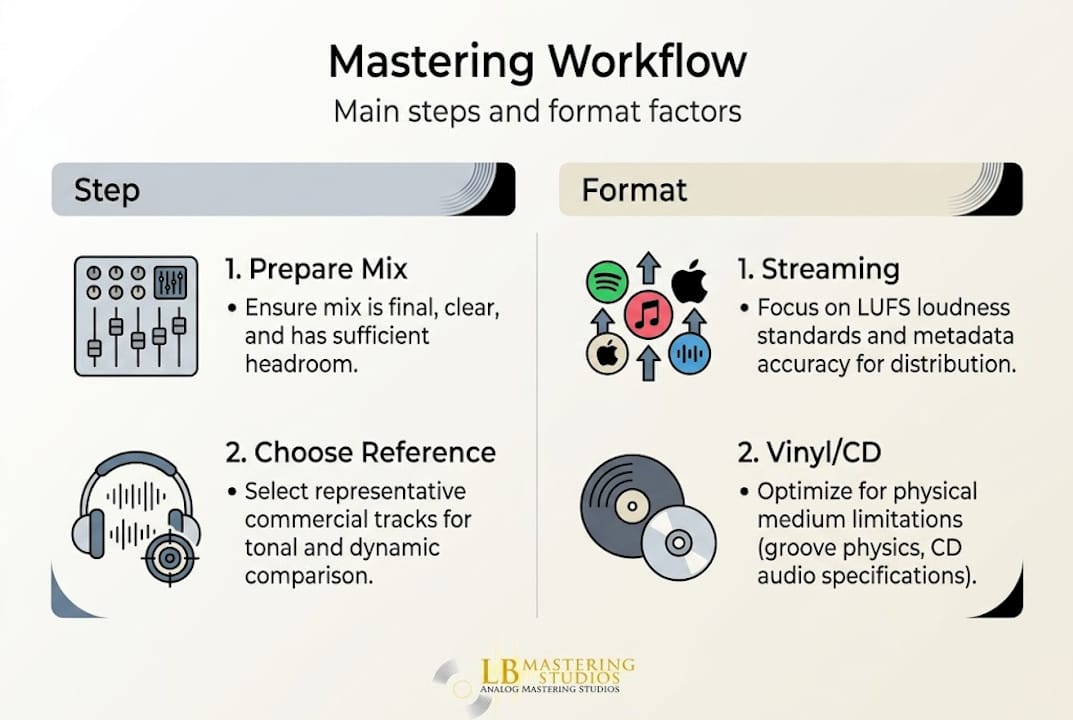
For streaming platforms like Spotify, Apple Music, and Tidal, the target is typically -14 LUFS integrated with a true peak of -1 dBTP. These platforms use loudness normalization, which means they automatically turn down tracks that are louder than their target level. Mastering louder than this does not give you an edge. In fact, louder is not better after normalization, and over-limited tracks often sound worse once the platform applies gain reduction. The goal is a master that sounds its best at the normalized level, not the loudest possible file.
For CD releases, you have slightly more dynamic flexibility since CDs do not use normalization. Peaks can approach 0 dBFS more closely, and loudness targets can be a little higher if the genre calls for it. The key constraint on CD is avoiding intersample clipping, which happens when reconstruction in the DAC causes peaks that exceed 0 dBFS even when the waveform looks like it stays below that level in the DAW. A true peak meter reveals this. Our CD mastering services include DDP file creation, the standard delivery format for CD replication plants.
For vinyl releases, the mastering requirements are genuinely different and require a dedicated master. Vinyl grooves have physical limits that digital formats do not. Excessive bass in the center of the stereo field can cause the cutting stylus to run out of groove space or cause skipping during playback. Our full vinyl mastering guide covers these specifics in detail. Our vinyl mastering services include specialized signal chain adjustments for this format.
Here is a format-specific overview:
- Streaming: -14 LUFS integrated, -1 dBTP true peak, prioritize dynamics
- CD: Up to -9 LUFS possible depending on genre, avoid intersample peaks, 16-bit final export with dither
- Vinyl: Separate master required, sum bass to mono below 150 Hz, control sibilance, leave extra headroom, check side-to-side groove width
Format comparison table:
| Format | Loudness target | True peak | Special requirements |
|---|---|---|---|
| Streaming | -14 LUFS | -1 dBTP | Normalization-compatible |
| CD | -9 to -12 LUFS | -0.3 dBTP | DDP delivery, dither to 16-bit |
| Vinyl | -18 LUFS or lower | -3 dBFS | Mono bass, sibilance control |
For a full breakdown of loudness standards going into 2026, our guide on loudness for 2026 is worth bookmarking before your next release.
What most guides miss about mastering a track
Most step-by-step mastering guides focus heavily on signal chain order and technical specs, and for good reason, those things matter. But after decades working with artists across every format, we believe the most important lesson is one that rarely gets stated directly: chasing loudness is the wrong goal.
Many artists come to us convinced that a louder master equals a better one. That belief made sense in the 1990s and early 2000s, before streaming normalization changed the rules. Today, a track mastered at -14 LUFS with excellent dynamics and translation will consistently outperform an over-limited track at -7 LUFS after a platform turns it down. The quality shows up after the gain reduction is applied, and a crushed waveform sounds flat and lifeless at any volume.
The second underappreciated truth is that vinyl mastering tips and format-specific thinking should never be afterthoughts. Artists who plan their mastering strategy before they even finish mixing, knowing whether they want a vinyl release, tend to make better mixing decisions that actually serve the final master.
Finally, consistent testing beats clever processing every time. Even our Grammy-winning engineers run their masters through car speakers, earbuds, and phone speakers before signing off. Use this mastering checklist to build that habit into every session. The discipline of checking translation is what separates professionals from amateurs, not the equipment.
Professional mastering services to elevate your music
If you have followed these steps and want a second opinion, or if you are ready to hand your mix to a team with over 44 years of experience, LB-Mastering Studios is here to deliver exceptional sonic results for every format.
We specialize in stereo mastering, stem mastering, vinyl mastering services, and CD mastering for artists and labels worldwide. Every project receives direct communication with the mastering engineer and a free sample master so you can hear the difference before you commit. Start your next project with our free mastering checklist to make sure your mix arrives ready to achieve the best possible result.
Frequently asked questions
What is the ideal file format and settings for mastering?
Export your mix as a 24-bit WAV file at 44.1 or 48 kHz, with peaks between -6 and -3 dBFS and at least 3 dB of headroom above your loudest transient.
Should I use one master for all formats or create separate masters for vinyl, streaming, and CD?
Professionals strongly recommend separate masters, since vinyl requires unique adjustments for groove physics and loudness limits that a single digital master cannot address properly.
How do I check if my master translates well on different playback devices?
Listen on monitors, headphones, car speakers, and in mono to verify consistent sound, because checking multiple systems reveals translation issues that studio monitors alone will not expose.
Why are reference tracks important in mastering?
Reference tracks give you a real-world commercial benchmark, since level-matched references from the same genre guide your decisions on balance, loudness, and punch in ways that remove guesswork.
What is dither, and when should I use it?
Dither is low-level noise applied to mask quantization errors when you reduce bit-depth, and you should apply dither when exporting from 24-bit to 16-bit to preserve maximum audio quality in your final master.