
 how-to
Common Vinyl Pressing Errors and How to Avoid Them
Table of Contents
- Understanding Vinyl Pressing Errors and Their Impact on Sound Quality
- How Pressing Variants and Editions Differ
- Common Vinyl Mastering Mistakes That Lead to Pressing Problems
- Identifying Pressing Defects Using Deadwax and Runout Markings
- Vinyl Test Pressing Checklist: What to Inspect Before Full Production
- Causes of Vinyl Record Skipping and Surface Noise Prevention
- Vinyl Surface Noise Causes and How to Minimize Them
- Prevention Across the Pressing Workflow: Mastering Through Delivery
- Frequently Asked Questions
Last Updated: October 20, 2026
Understanding Vinyl Pressing Errors and Their Impact on Sound Quality
Vinyl pressing errors are defects that occur during manufacturing, from mastering through final delivery. They affect how your record sounds and how collectors perceive your release.
Common vinyl pressing errors range from minor surface noise to skipping, some cosmetic, others making records unplayable.
Mastering mistakes flow downstream to stamper creation, pressing, and quality control, and a single error can ruin an entire run.
How Pressing Variants and Editions Differ
A pressing variant is a version of your record that differs measurably from another, colored vinyl, alternative cover art, or a different pressing facility, affecting collectibility and sometimes sound quality.
Editions refer to the manufacturing run itself. A first edition has different deadwax markings than a second, and collectors track editions because they indicate when and where a record was made.
Common Vinyl Mastering Mistakes That Lead to Pressing Problems
Vinyl mastering mistakes cascade downstream. The most common is mastering too loud without headroom for the cutting lathe, causing the stylus to jump during playback.
Another frequent mistake is ignoring vinyl's groove geometry: extremely low frequencies and excessive stereo width cause tracking problems and skipping.
Improper EQ is a third major mistake.
Many engineers also fail to account for runout groove space. Cutting too close to the runout leaves no margin for error during pressing.
Key mistakes to avoid:
- Mastering without adequate headroom for the cutting lathe
- Ignoring low-frequency limitations specific to vinyl
- Over-boosting high frequencies without testing
Identifying Pressing Defects Using Deadwax and Runout Markings
The deadwax is the non-grooved area between the label and the groove; the runout is the final groove spiral before the record ends.
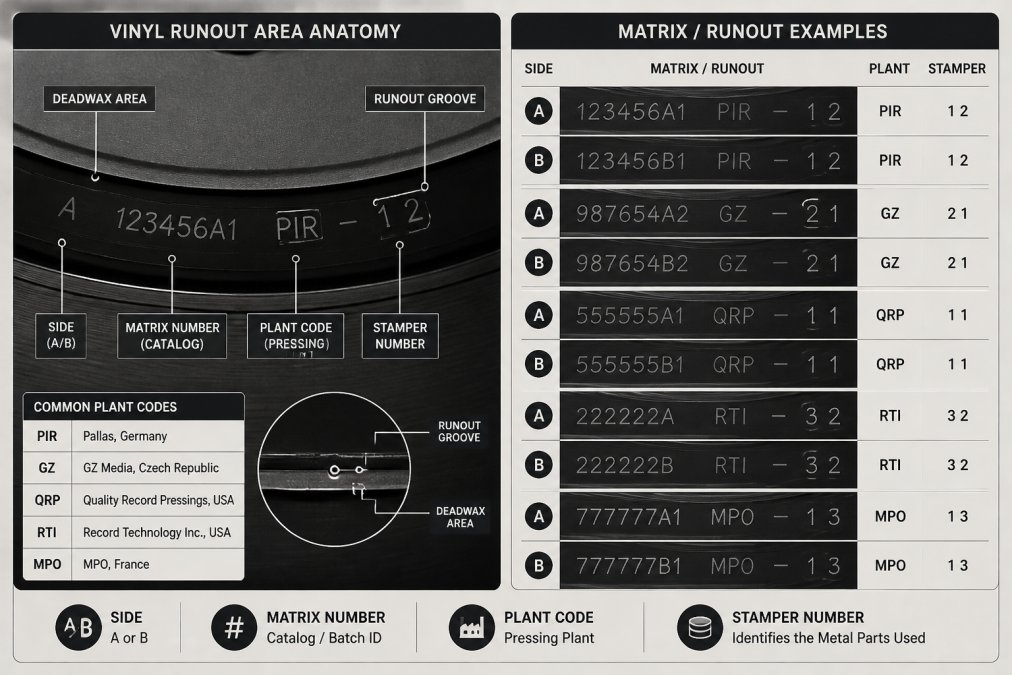
Runout markings often repeat the deadwax matrix information, sometimes with additional plant notes, and help verify the correct master was used.
To inspect these areas, use a bright light and magnifying glass. Look for:
- Clear, legible matrix numbers matching your specifications
- Consistent depth in the runout groove
- No visible scratches or damage in the deadwax
If markings are smudged, incomplete, or don't match your master specifications, contact your pressing plant immediately.
Vinyl Test Pressing Checklist: What to Inspect Before Full Production
A test pressing is a small batch pressed from your master before the full run, letting you catch errors before investing in thousands of units.
Order test pressings for every release and listen on multiple turntables before approving production, many defects only become obvious during playback.
Vinyl test pressing checklist:
- Play both sides on at least two different turntables
- Check for skipping, jumping, or tracking issues
- Listen for surface noise, pops, and clicks
If you find issues, halt production immediately and work with the plant to fix the root cause.
Causes of Vinyl Record Skipping and Surface Noise Prevention
Skipping, surface noise, and groove defects are the most common playback complaints, but they have different causes and fixes. Treating them as one problem wastes money when cleaning or setup changes would have solved it.
Skipping and Jumping
Skipping occurs when the stylus loses groove contact and jumps to an adjacent groove or off the record, almost always because of excessive groove-wall movement the tonearm cannot track.
Likely causes, in order of frequency:
- Mastering with too much low-frequency energy or out-of-phase bass. Vertical groove modulation exceeds what the cartridge can track. This is a mastering error, not a pressing defect.
- Insufficient headroom during cutting. A hot master leaves no margin for the lathe, producing grooves that are too shallow or too steep.
- Improper turntable setup. Too little tracking force, a worn stylus, or a misaligned cartridge can cause skipping on records that are perfectly fine.
How to distinguish: Play the same passage on a second turntable with a known-good setup. If it skips there too, the problem is in the record (mastering or pressing). If it plays cleanly, your setup is the culprit.
Surface Noise: Pops, Clicks, and Crackle
Surface noise is any unwanted sound between or during passages, ranging from faint crackle to loud pops that compete with the music.
Sources of surface noise:
- Manufacturing defects. Non-fill, pimples, bubbles, and incomplete groove formation create noise that cleaning cannot fix.
- Contamination during pressing. Dust, paper fibers, or regrind particles pressed into the vinyl.
- Post-pressing damage. Scratches from improper handling, storage, or shipping.
How to distinguish: Clean the record with a wet-cleaning method and play it again. If the noise persists in the same location, it is likely a pressing defect. If it moves or diminishes, it was contamination. A defect that appears on every copy of the same pressing indicates a manufacturing problem; a defect on one copy only is likely handling damage.
Non-Fill and Incomplete Groove Formation
Non-fill occurs when molten vinyl fails to completely fill the stamper's grooves, leaving a patch of missing or rounded groove wall that produces a "shhh" or distortion sound, often on loud passages or the outer edge.
What non-fill looks and sounds like: Under angled light, non-fill appears as a dull, grayish patch where the groove should be sharp and shiny.
Likely causes:
- Stamper wear or damage. A worn stamper cannot form grooves cleanly.
- Insufficient pressing pressure or dwell time. The vinyl cools before it fully fills the groove.
- Improper vinyl temperature. Too-cool vinyl flows poorly; too-hot vinyl can degrade.
How to distinguish from playback issues: Non-fill is repeatable on every copy from the same stamper and does not change with tracking force or cleaning.
Pimples, Bubbles, and Warping
Pimples are small raised bumps, usually caused by dirt or regrind trapped between stamper and vinyl.
Bubbles are voids trapped in the vinyl, often from moisture or air in the press.
Warping is permanent bending from heat exposure during cooling, storage, or shipping.
How to distinguish: Pimples and bubbles are visible under angled light and are repeatable across copies if they come from a stamper or press issue.
Prevention Strategies
- Master with proper headroom and limit extreme low-frequency content below 50 Hz to reduce groove-wall movement.
- Avoid excessive stereo width in bass frequencies; keep low frequencies centered to prevent vertical modulation that causes skipping.
- Specify high-quality pressing plants with strict temperature, pressure, and dwell-time monitoring.
Vinyl Surface Noise Causes and How to Minimize Them
Surface noise on vinyl comes from multiple sources. Manufacturing defects create the primary noise floor. Dust and debris create additional noise during playback.
Pressing quality determines your baseline noise level.
During pressing, the plant's quality control matters enormously.
After pressing, proper storage and handling reduce dust accumulation. Use inner sleeves that don't shed fibers. Store records upright, not stacked flat.
Prevention Across the Pressing Workflow: Mastering Through Delivery
Preventing vinyl pressing errors requires attention at every stage, from mastering through delivery. Here is a practical quality-control framework for plants, labels, and artists, plus a decision tree for buyers who receive a defective record.
For Mastering Engineers and Artists
**1.
2. Document your specifications. Give the plant written notes on target loudness, runout matrix numbers, side designation, and special requirements.
3. Inspect stampers before pressing. A worn or damaged stamper is a leading cause of non-fill and surface noise.
4. Review test pressings rigorously. Play both sides on at least two turntables with different cartridges.
5. Sample the full production run. A good test pressing doesn't guarantee a good full run, conditions drift between batches.
For Pressing Plants
Quality-control checkpoints that prevent common defects:
- Vinyl temperature and press cycle time. Too-cool vinyl causes non-fill; too-hot vinyl degrades. Monitor and log these parameters for every run.
- Stamper inspection and replacement schedule. Track the number of pressings per stamper and replace before wear becomes audible.
- Cooling and handling. Proper cooling prevents warping; careful handling prevents scratches and contamination.
For Buyers: A Decision Tree for Defective Records
Not every audible problem is a pressing defect. Use this sequence before requesting a return:
- Clean the record. Wet-clean with a record-cleaning solution and a microfiber brush. Play again. If the noise diminishes or moves, it was contamination.
- Check your setup. Verify tracking force, anti-skate, and cartridge alignment. Play the record on a second turntable if possible. If the problem disappears, it was a setup issue.
- Inspect the record under bright light. Look for scratches, non-fill patches, pimples, bubbles, or warping. Visible physical defects that persist after cleaning point to a pressing problem.
- Compare another copy or side. If the same defect appears on a second copy of the same pressing, it is likely a manufacturing issue. If it appears only on one copy, it may be handling damage.
- Document the evidence. Record a short video or audio clip of the defect, photograph the visible flaw, and note the matrix numbers and where you purchased the record.
- Contact the seller or label. Provide your evidence and request a replacement or refund. Most reputable sellers will honor a return for a verifiable pressing defect.
Defect Severity and Repeatability
Not all defects warrant a replacement. A minor pimple outside the groove path is cosmetic; a non-fill patch on a loud passage is audible and likely to recur across copies from the same stamper. Assess severity by asking:
- Is the defect audible during normal playback? If not, it may be acceptable.
- Is it repeatable on another copy? If yes, it is a manufacturing issue that affects the whole run.
- Does it affect tracking or cause skipping? If yes, request a replacement.
What Listeners Can and Cannot Measure
Listeners can identify symptoms, skipping, noise, distortion, but cannot measure the pressing variables (temperature, pressure, cycle time, stamper wear) that caused them. Documentation and communication with the plant matter: the plant has the process data, the listener has the playback evidence, and combining both resolves defects fastest.
Frequently Asked Questions
What are the most common defects in vinyl records after pressing?
The most frequent pressing defects include non-fill (incomplete groove formation), surface imperfections like pimples and bubbles, warping from heat or improper storage, and pops and clicks from dust or debris. Skipping occurs when the tonearm cannot track the groove due to severe defects or improper groove depth. Each defect stems from different stages of the pressing process, from mastering decisions to quality control during manufacturing. Identifying which defect you're experiencing helps trace the root cause.
How can vinyl mastering mistakes cause pressing problems?
Vinyl mastering mistakes directly affect how the stamper cuts the groove and how the pressing reproduces sound. Over-compressed mastering creates shallow grooves that the stylus cannot track cleanly, leading to skipping and distortion. Excessive treble boosts cause surface noise and tracking issues. Poor stereo separation can cause the tonearm to jump. Mastering engineers must optimize for vinyl's physical constraints, groove spacing, tracking force limits, and surface area. Professional vinyl mastering accounts for these factors to ensure the final pressing plays cleanly across all turntables and tonearms.
What should I check on a test pressing before approving full production?
Use a vinyl test pressing checklist that includes: listening for pops, clicks, and distortion across both sides; checking groove formation by examining the deadwax and runout markings under light; inspecting for surface imperfections like pimples or bubbles; testing tracking on multiple turntables with different stylus weights; verifying stereo separation and imaging; and confirming label centering and jacket alignment. Play the test on at least one quality turntable before approval. Any defects found at this stage can be corrected before the full pressing run, saving time and cost.
Why does vinyl record skipping happen and how can I prevent it?
Vinyl record skipping occurs when the stylus cannot maintain contact with the groove due to improper groove depth, warping, dust, or tracking force issues. The causes of vinyl record skipping include non-fill defects during pressing, excessive surface noise, or a groove cut too shallow during mastering. Prevention begins with professional vinyl mastering that optimizes groove depth and spacing. Use proper storage (vertical position, stable temperature, away from heat) to prevent warping. Regular record cleaning removes dust and debris. Have the pressing checked at the test stage so corrections can be made before full production.