
 ultimate-guide
Setting Up a Hybrid Studio for Professional Sound
Table of Contents
- What Is a Hybrid Studio and Why It Matters
- Essential Components for Your Hybrid Setup
- Understanding Analog Outboard Gear for Mastering
- Hybrid Studio Signal Flow and Routing
- Hardware Integration Into Your DAW Workflow
- Budget-Conscious Hybrid Scaling for Independent Artists
- Session Recall and Workflow Efficiency
- Common Mistakes to Avoid in Hybrid Studio Setup
- Frequently Asked Questions
Last Updated: September 22, 2026
What Is a Hybrid Studio and Why It Matters
Setting up a hybrid studio for professional sound combines analog outboard gear with digital audio workstations to capture the sonic character of analog equipment while maintaining the flexibility and efficiency of modern recording and mixing technology. This approach leverages the warmth and harmonic distortion that analog gear imparts, plus the precision, recall, and scalability of digital workflows.
A hybrid setup bridges the gap between purely digital mixing (which lacks analog coloration) and fully analog workflows (which sacrifice non-destructive editing and session recall). You route individual tracks or entire mixes through analog processing before returning them to your DAW for final mastering or distribution preparation.
At LB-Mastering Studios, we've built our facility around this hybrid philosophy, ensuring every mix receives the sonic character that streaming platforms and physical formats demand while maintaining flexibility for revisions and format-specific mastering.
Essential Components for Your Hybrid Setup
Building a functional hybrid studio for professional sound requires a quality audio interface with sufficient I/O, a summing mixer to manage signal flow, outboard gear for processing, and a patchbay for routing flexibility.
Start with an audio interface offering at least 8-16 channels of I/O with low-latency performance and solid AD/DA converters. The quality of your digital-to-analog conversion directly impacts how faithfully your analog gear receives the signal from your DAW, and the return path determines how accurately the processed signal is captured back into your mix.
A summing mixer serves as the central hub where your analog outboard gear connects, providing organized gain staging, metering, and a stereo summing bus essential for monitoring and final output. Most hybrid setups use a compact summing mixer (8-16 channels) paired with a patchbay for flexibility.
Your outboard gear selection depends on your mixing style and budget. Common starting points include a mastering-grade compressor, parametric EQ, and saturation device, these three handle most mixing and mastering tasks.
Invest in quality balanced XLR cables for your outboard connections; cutting corners here creates audible hum and signal degradation.
Understanding Analog Outboard Gear for Mastering
The most critical pieces for mastering work are compressors, EQs, and saturation devices, each serving a specific purpose in the mastering chain.
A mastering-grade compressor controls dynamic range while adding harmonic color. Unlike mixing compressors, mastering compressors work subtly with ratios between 2:1 and 4:1, longer attack times, and gentle knee curves. Tube or transformer components contribute warmth that digital emulation rarely matches.
A mastering parametric EQ provides surgical precision for correcting frequency imbalances without obvious coloration, using discrete component design to avoid phase shift and artifacts.
Saturation and tape emulation devices add harmonic distortion that glues a mix together. A small amount of analog saturation (typically 2-6 dB of gain reduction equivalent) increases perceived loudness and cohesion, this is the "analog warmth" that distinguishes a professionally mastered track.
Proper gain staging ensures each piece of equipment operates in its optimal headroom range. Pushing a compressor too hard introduces unwanted artifacts; pulling back too far wastes its character-shaping potential.
Hybrid Studio Signal Flow and Routing
Proper signal flow is where most hybrid studios fail. Your signal must travel from your DAW through your audio interface, into your outboard gear, and back without introducing latency, noise, or impedance mismatches.
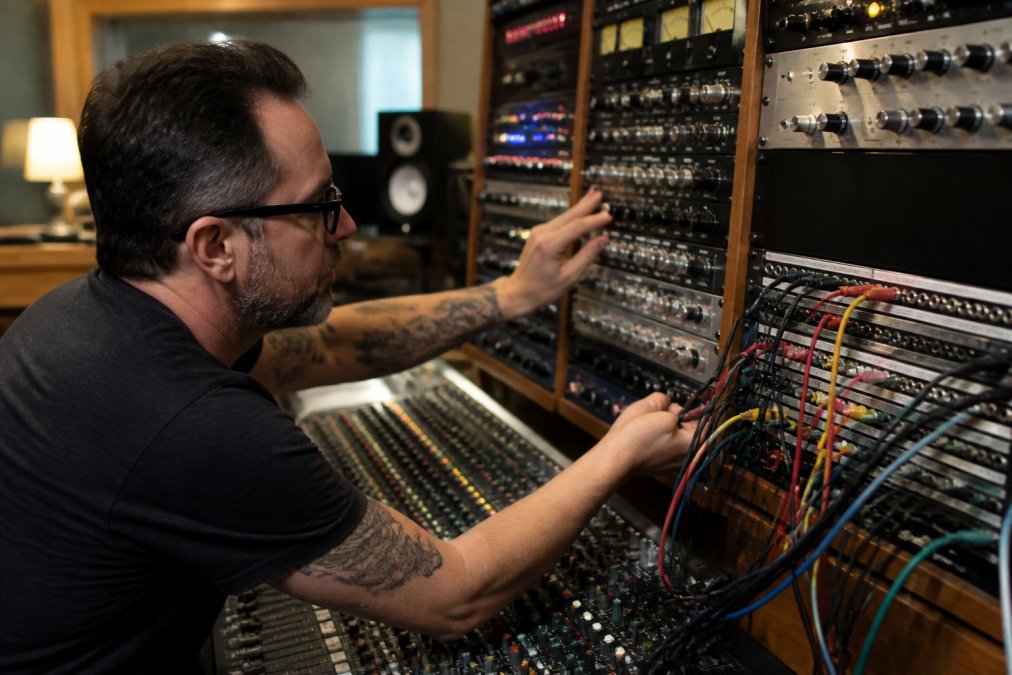
The standard hybrid signal flow is: DAW output → audio interface output → summing mixer → outboard gear (via patchbay) → summing mixer return → audio interface input → DAW. This keeps your mix digital until the final summing stage, where it passes through analog processing before returning to your DAW.
A patchbay simplifies routing by presenting all audio connections in one organized panel, letting you reconfigure your signal path instantly. Half-normalized patchbays allow you to break the normal signal flow without disconnecting cables.
Your summing mixer becomes the convergence point where individual analog processors connect. The order matters: most mastering engineers place saturation early (to add character), followed by EQ (for correction), then compression (for glue and dynamic control).
Setting Up Your I/O and Patchbay
Each channel should be clearly labeled and gain-staged so that nominal operating level (typically -18 dBFS in the DAW) translates to 0 VU on your summing mixer's meters, preventing clipping while allowing your analog gear to operate optimally.
A patchbay's normal signal path should route your main stereo output through your primary processing chain. When you insert a patch cable, it interrupts this path, allowing you to insert additional gear or reroute signals.
Label every connection clearly using color-coded tape, printed labels, and documentation of your default signal flow. This documentation becomes invaluable when recalling a specific session months later.
Latency Compensation and Monitoring
Latency in a hybrid setup occurs at two points: the round-trip delay from your DAW through your audio interface to your outboard gear and back. While analog gear introduces negligible latency, your audio interface's conversion creates measurable delay, typically 2-5 milliseconds depending on your interface and buffer size.
For mixing, this latency matters during recording and real-time monitoring. Most audio interfaces offer direct monitoring, a hardware mixing function that lets performers hear the input signal directly, bypassing the DAW entirely and eliminating latency.
For mastering, latency during playback is irrelevant because you're not recording. However, account for latency when setting up your monitoring chain by inputting a latency offset value in your DAW to keep visual feedback aligned with what you hear.
Ensure your monitoring controller sits after your processing chain to prevent accidentally adjusting outboard gear level when you meant to adjust monitoring level.
Hardware Integration Into Your DAW Workflow
Most modern DAWs support external insert plugins, software objects that route audio out of your DAW, through your audio interface, into your outboard gear, and back in again.
Your audio interface must have dedicated output pairs for each piece of outboard gear. Interfaces with 8, 16, or 24 outputs provide flexibility as your setup grows.
Configure your external inserts by specifying the output pair, input pair, and round-trip latency for each piece of gear. Your DAW will automatically compensate for latency; without it, your outboard processing will sound delayed, creating phase issues.
Session recall becomes complex when hardware is involved. Unlike plugin presets, which save automatically with your session, analog gear doesn't store settings digitally. Document your outboard gear settings for every mix: take photographs of compressor knob positions, EQ curve settings, and saturation levels. Many mastering engineers maintain detailed session notes that include analog gear settings, buffer sizes, and any unusual routing decisions.
Budget-Conscious Hybrid Scaling for Independent Artists
Building a hybrid studio on a limited budget requires prioritizing the gear that delivers the most sonic improvement per dollar spent. Start with a quality summing mixer and a single mastering-grade compressor. These two pieces alone transform a purely digital mix into something with professional character.
A used summing mixer from a reputable manufacturer (typically $800-$2,000 for quality gear) provides the foundation. The summing mixer's job is relatively straightforward, it combines your mix and provides metering, so vintage or slightly older models perform as well as new ones.
Your first outboard compressor should be versatile enough for both mixing and mastering. A tube compressor with a variable ratio and adjustable knee gives you options for subtle mastering work or more aggressive track compression. Budget models exist, but the difference in sound quality between a $500 compressor and a $2,000 compressor is substantial.
Session Recall and Workflow Efficiency
Session recall separates professional mastering facilities from amateur setups. When you finish mastering a track and the artist requests revisions three months later, you need to recreate your exact processing chain instantly. With purely digital workflows, this is automatic, your DAW saves plugin settings. With analog gear, it requires discipline.
Common Mistakes to Avoid in Hybrid Studio Setup
The most frequent error is improper gain staging. Too many hybrid studios operate with excessive levels at every stage, hot outputs from the DAW, summing mixer inputs running at +6 dB, and outboard gear inputs clipping. This approach sacrifices headroom and introduces unnecessary distortion. Professional gain staging targets -18 dBFS in your DAW, 0 VU on your summing mixer, and -6 dBFS on your audio interface inputs.
Frequently Asked Questions
What's the real difference between a hybrid studio and pure digital mixing?
A hybrid studio combines your DAW with analog outboard gear, compressors, EQs, summing mixers, to add warmth, harmonic distortion, and dynamic range shaping that digital plugins emulate but don't replicate. Analog saturation and the natural compression curves of hardware create a sonic character many engineers prefer for mastering. Your DAW handles tracking, editing, and recall; the analog chain handles the final polish. This approach gives you the best of both: digital flexibility and analog character.
How do I manage latency when routing audio through hardware inserts?
Latency compensation is essential in hybrid setups. When you send audio from your DAW to outboard gear and back, the analog-to-digital and digital-to-analog conversion introduces delay (typically 2-5ms per round trip). Most DAWs allow you to manually add delay to other tracks to align them, or use hardware inserts with built-in latency reporting. Test your signal path with a click track: send it through your hardware chain and measure the delay, then compensate in your DAW's settings. Some interfaces offer automatic latency detection, use it if available.
Do I need expensive analog gear to set up a hybrid studio, or can I start small?
Start small and scale. A single quality summing mixer and one compressor or EQ can transform your sound without breaking the budget. Focus on gain staging and signal flow first, poor routing wastes expensive gear. Many successful hybrid studios began with one piece of outboard hardware and added gear over years. Quality matters more than quantity; a well-maintained vintage compressor often outperforms newer budget units. Invest in proper balanced cables and an audio interface with clean AD/DA converters before adding more gear.
Can a hybrid studio setup handle both streaming and vinyl mastering?
Yes, but vinyl mastering requires specific considerations. Vinyl has physical limitations: stereo imaging width, frequency response, and dynamic range constraints differ from streaming masters. A hybrid studio with proper monitoring and analog summing can deliver both, but vinyl mastering demands expertise in gain staging, harmonic distortion management, and understanding how the cutting lathe interprets your master. Many independent artists master for streaming first, then send stems or the stereo mix to a specialized vinyl mastering engineer. LB-Mastering Studios handles vinyl mastering with the technical precision vinyl distribution requires, ensuring your physical copies sound as professional as your digital releases.